Explore our interactive
guide to K-12 school
ventilation.


Explore our interactive
guide to K-12 school
ventilation.
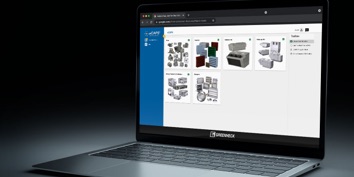
Experience our
best-in-class product
selection with eCAPS®.
Select the best system
for your application,
with FEI.
Reach a new level of
comfort and efficiency
with the Model RT.
Explore our interactive
guide to K-12 school
ventilation.
Experience our
best-in-class product
selection with eCAPS®.
Select the best system
for your application,
with FEI.
Reach a new level of
comfort and efficiency
with the Model RT.
Explore our interactive
guide to K-12 school
ventilation.
Experience our
best-in-class product
selection with eCAPS®.
Select the best system
for your application,
with FEI.
Reach a new level of
comfort and efficiency
with the Model RT.
Need help or support of have a question?
Contact info@greenheck.com
For over 75 years, Greenheck has been committed to advancing the highest levels of indoor air quality by providing the industry’s most comprehensive line of products for moving, controlling, and conditioning air in commercial, industrial, and institutional buildings.
We pride ourselves on doing everything to exceed expectations for on-time delivery, easy installation, performance, and energy efficiency. We call it “Building Value in Air.” It’s our commitment to our customers, and it remains the fundamental driving force behind everything we do.

 |
Comfort and Fresh Air |  |
Occupant Safety |  |
Reliability |
 |
Energy Efficiency |  |
Quiet Operation |  |
Easy Maintenance |
Greenheck offers best-in-class software and tools to support your product selection process. Our product selection software programs, CAPS® and eCAPS®, guide you from initial design through detailed submittals.